Integration · REST API and webhooks · disabled by default

Your software controls the calls. The softphone reports back.

A local REST API and built-in webhooks for CTI integration. No SDK, no intermediary cloud service, and no externally exposed network listener.

Enable integration in Settings → Integration. The softphone then provides an HTTP API reachable only from this computer and sends call events to the endpoint you configure. All requests and events use JSON, so curl or any HTTP client in your stack is enough to get started.

  • 127.0.0.1The API listens on the loopback interface only and is not reachable from the network.
  • application/jsonAll responses and events. No XML, no SOAP.
  • 3Call events: started, state changed, ended — enough for screen pops and call logging.
  • 0Nothing to install on either side. Any HTTP client will do.

Overview

REST API and webhooks

Use the REST API when your application needs data from the softphone or needs to control a call. Use webhooks when your application must react to call events as they happen, without polling. Most integrations use both; the two mechanisms are independent.

PULL

REST API — you control

A localhost-only HTTP API inside the softphone. Read contacts, call history, SIP accounts and active calls; start, answer, hold, transfer and hang up calls; send DTMF digits.

  • Click-to-call from a CRM or help desk
  • Real-time wallboard of active calls
  • Call log synchronisation after downtime
  • Prometheus metrics for the softphone
  • Call control from buttons in your own interface
PUSH

Webhooks — it notifies you

An HTTP request from the softphone to an endpoint you choose whenever a call starts, changes state or ends. This is what opens the customer record before the second ring.

  • Screen pop: the caller’s record opens while the phone is still ringing
  • Real-time call logging to your database
  • Triggering queues, bots or workflows on incoming calls
  • Presence: publishing agent status to other systems
  • An event trail that does not depend on polling

REST API · setup

Setup: one switch and a port

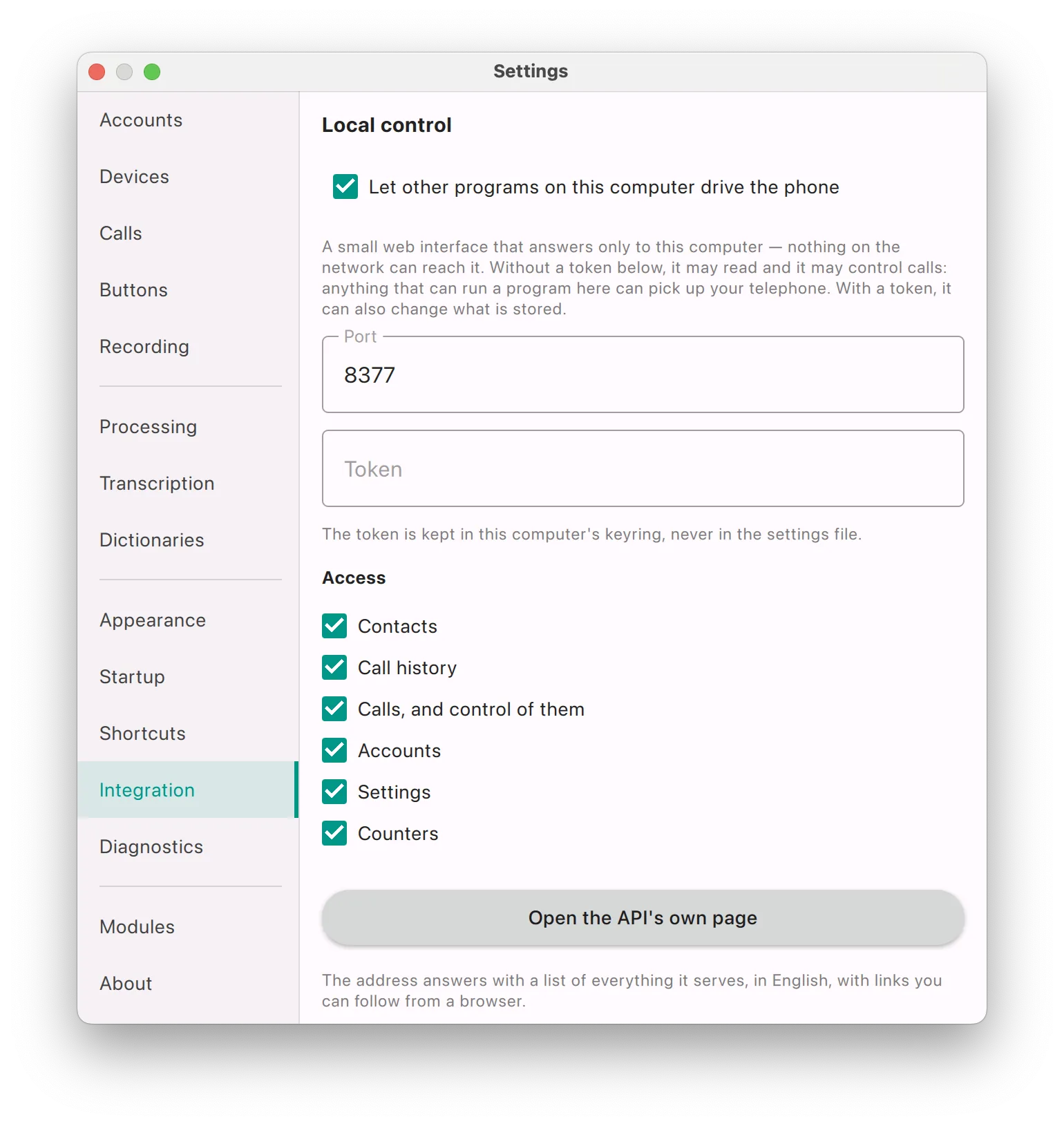
Go to Settings → Integration → Local control. Enable the API, keep the default port unless it is already in use, and select which access groups the API exposes. No separate service needs to be installed and no restart is required.

The Local control panel in Settings: a switch that allows other programs to control the softphone, a port field, a token field and six access group checkboxes.
Settings → Integration → Local control. Once a token is set, the field shows Saved — type to replace it: the value is stored in the operating system keychain, never in the settings file.
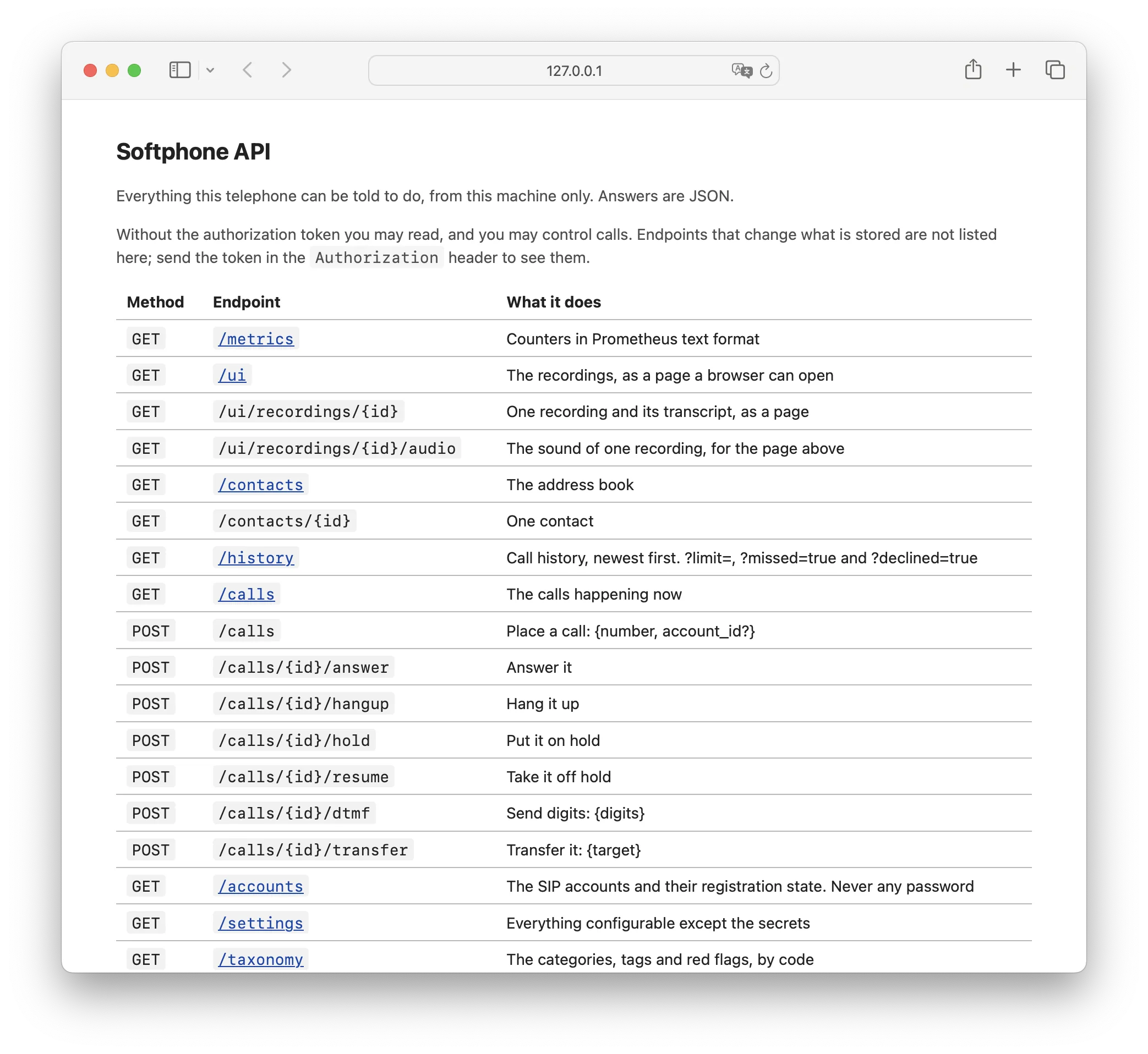
The API index page at 127.0.0.1:8377, listing every endpoint with its method and a short description.
The API root serves its own documentation. Open http://127.0.0.1:8377 in a browser to see every endpoint; read-only endpoints are clickable links.
  1. Enable “Let other programs on this computer drive the phone”

    The server starts immediately. It listens on the loopback interface only, so it is reachable from this computer and not from the office network, a VPN or other machines.

  2. Choose a port

    The default is 8377. Change it only if another application already uses that port.

  3. Set a token (optional)

    Without a token, any program on this computer can read data and control calls. When a token is set, it is also required for all requests that change stored data.

  4. Select access groups

    Contacts, call history, calls and call control, accounts, settings, metrics. Disabling a group is not a response filter: its endpoints are not served at all.

  5. Test the connection

    curl http://127.0.0.1:8377/accounts. If the response is JSON, the API is working and the rest of this page is reference material.

Access levels

Access control is based on changing stored data, not on reading. Without a token, clients can read everything covered by the enabled groups and control active calls: place, answer, hang up, hold, resume, transfer and send DTMF. With the token in the Authorization header, clients can also use write endpoints; without it, those endpoints are neither served nor listed on the index page.

request exampleshell
# read requests need no token
curl http://127.0.0.1:8377/accounts

# write requests need the token from Settings
curl -X POST http://127.0.0.1:8377/calls \
  -H 'Authorization: <your token>' \
  -H 'Content-Type: application/json' \
  -d '{"number":"+15551234567","account_id":"aa24a2c4-709b-402a-ac58-7ca6788dcb94"}'

Make sure whoever approves the integration understands this: without a token, any program running on this computer can control the softphone, including answering calls. On a single-user workstation this is usually acceptable. On shared or managed machines, set a token and handle it like any other credential.

Access groups

Six groups: contacts, call history, calls and call control, accounts, settings, metrics. When a group is disabled, its paths return 404 {"error":"no such endpoint"}, exactly like a non-existent path, and the refusal is counted in api_requests_refused_total.

REST API · reference

Endpoints and responses

Base URL: http://127.0.0.1:8377. Every identifier is a UUID issued by the softphone: a call id comes from /calls or from the response to POST /calls, an account id from /accounts. The endpoints below require no token; write endpoints appear on the index page once a token is sent.

Field names are snake_case, and the suffix gives the type: _id is a reference to a UUID, _ts is an instant in Unix milliseconds (UTC), _s is a duration in seconds. This applies to the REST API and to webhooks alike; /settings keeps its own names.

Updating an older integration. Earlier versions used camelCase and short identifiers. accountId is now account_id, startedAt is callstart_ts, durationSeconds is duration_s, answeredBy is answered_by, and the webhook field at is event_ts. Calls and accounts are identified by UUID only: runtimeId and identifiers such as call-3 or account-2 are no longer returned or accepted.

MethodEndpointDescription
GET/metricsMetrics in Prometheus format
GET/uiRecordings list as an HTML page
GET/ui/recordings/{id}Recording with its transcript as an HTML page
GET/ui/recordings/{id}/audioRecording audio for the page above
GET/contactsContact list
GET/contacts/{id}A single contact
GET/historyCall history, newest first. Supports ?limit=, ?missed=true and ?declined=true
GET/callsActive calls
POST/callsStart a call: {number, account_id?}
POST/calls/{id}/answerAnswer the call
POST/calls/{id}/hangupHang up the call
POST/calls/{id}/holdPut the call on hold
POST/calls/{id}/resumeResume a held call
POST/calls/{id}/dtmfSend DTMF digits: {digits}
POST/calls/{id}/transferTransfer the call: {target}
GET/accountsSIP accounts and registration status. Passwords are never returned
GET/settingsFull configuration, excluding secrets
GET/taxonomyCategories, tags and red flags with their codes

Active calls

The calls in progress on this workstation and the state of each. Use it for a wallboard, or to read the full picture after a webhook arrives.

GET /calls200 · application/json
[
        {
          "id": "7620f1c5-fa8e-4453-80bf-4274f5324bec",
          "seance_id": "0b6f1d2e-5c3a-4f8e-9a71-2d4c6e8f0a13",
          "account_id": "aa24a2c4-709b-402a-ac58-7ca6788dcb94",
          "direction": "in",
          "state": "hold",
          "number": "+15551234567",
          "name": "Jane Miller",
          "uri": "sip:+15551234567@pbx.example.com",
          "dialed": "",
          "muted": false,
          "event_ts": 1788788942412,
          "callstart_ts": 1788788890398,
          "callstate_ts": 1788788911207
        }
      ]
FieldDescription
idThe call’s UUID: the {id} in /calls/{id}/… and the id in webhooks. It stays the same for the whole call.
seance_idThe conversation the call belongs to. Calls linked by a transfer, a consultation or a conference share the same seance_id.
account_idThe line the call is on: an id from /accounts.
statedialing, ringing-out, ringing-in, active, hold (held by this softphone), onhold (held by the other party), conference or ended. When more than one applies, conference takes precedence over hold, and hold over onhold.
mutedWhether the microphone is muted on this call. Muting does not change state.
callstart_ts / callstate_tsWhen the softphone first learned of the call, and when the call entered its current state. null if not known.
event_tsWhen this response was generated. Compare it with callstate_ts to see how long the call has been in its current state without relying on your own clock.

Starting a call

The only write endpoint most integrations need. account_id is optional; if omitted, the call is placed on the line currently selected in the dialer.

POST /callsrequest
{ "number": "+15551234567", "account_id": "aa24a2c4-709b-402a-ac58-7ca6788dcb94" }

number is required. Without it, the API returns 400 with {"error":"a call needs a number"} and no call is placed.

The response contains the new call’s UUID. Use it in /calls/{id}/…; webhooks for this call carry the same id. The number is completed on the chosen account the way the dialer completes it: 1001 is sent as sip:1001@pbx.example.com.

POST /calls200 · application/json
{ "id": "7620f1c5-fa8e-4453-80bf-4274f5324bec" }

POST /calls/{id}/transfer completes target the same way, on the account the call is on. A target that already contains a scheme or an @ is sent unchanged.

Accounts

Configured lines, their settings and current PBX registration status. Passwords are never included in the response and cannot be retrieved through the API.

GET /accounts200 · application/json
[
        {
          "id": "aa24a2c4-709b-402a-ac58-7ca6788dcb94",
          "display_name": "1001 Reception",
          "username": "1001",
          "auth_user": "",
          "domain": "pbx.example.com",
          "registrar": "",
          "outbound_proxy": "pbx.example.com:9061",
          "port": 9061,
          "transport": "udp",
          "verify_certificate": true,
          "media_encryption": "off",
          "expiry_s": 300,
          "enabled": true,
          "dtmf": "rfc2833",
          "auto_answer": false,
          "auto_answer_after_s": 0,
          "address": "1001@pbx.example.com",
          "state": "registered"
        }
      ]
FieldDescription
idPersistent account UUID — the only identifier an account has in the API. It is the account_id in calls, call history, contacts and webhooks, and the {id} in PUT /accounts/{id}.
transport / media_encryption / verify_certificateSIP transport: udp, tcp or tls. media_encryption is off, offered or required; verify_certificate controls whether the PBX certificate is checked on a TLS connection.
stateCurrent registration state on the PBX: registered while the line is active.
enabledWhether the line is enabled, regardless of its registration state.

Call history

Newest first, 100 entries unless ?limit= says otherwise. ?missed=true returns missed calls only, ?declined=true only the calls this softphone declined.

GET /history?limit=2200 · application/json
[
        {
          "id": "5d0c9e4a-2b7f-4c1e-8a3d-6f9b0e1c2d34",
          "seance_id": "9a3e7c15-4d2b-4e8f-b6a0-3f1c5d7e9b28",
          "callstart_ts": 1788780041733,
          "direction": "in",
          "outcome": "missed",
          "answered": false,
          "duration_s": 0,
          "number": "1012",
          "name": "Jane Miller",
          "uri": "sip:1012@pbx.example.com",
          "dialed": "",
          "account": "1001@pbx.example.com",
          "account_id": "aa24a2c4-709b-402a-ac58-7ca6788dcb94",
          "reason": "cancelled",
          "answered_by": "no"
        },
        {
          "id": "5217a034-c801-4aa2-ad93-7d3b42753512",
          "seance_id": "c4e2a9d0-7b31-4f6a-9e05-1d8c3b7a6f52",
          "callstart_ts": 1788782704116,
          "direction": "out",
          "outcome": "answered",
          "answered": true,
          "duration_s": 20,
          "number": "506",
          "name": "Warehouse",
          "uri": "sip:506@pbx.example.com",
          "dialed": "506",
          "account": "500@pbx.example.com",
          "account_id": "380750e3-acd4-4cb4-abe4-cba347781fe7",
          "reason": "local-hangup",
          "answered_by": "no"
        }
      ]
FieldDescription
idThe history entry’s own UUID. It is not the call id used by /calls and webhooks; seance_id links the two.
seance_idThe conversation the call belongs to. Calls linked by a transfer, a consultation or a conference share the same seance_id.
directionin or out.
number / uriRemote party as a number and as the actual SIP URI.
nameResolved from contacts when the number is known; otherwise an empty string. Do not match on this field — use number.
dialedDigits dialled for an outgoing call. Empty for incoming calls.
account / account_idThe line used for the call, as an address and as the UUID from /accounts.
callstart_tsWhen the call started, in Unix milliseconds (UTC). Convert to local time on your side.
duration_sZero for calls that were never connected.
outcomePrimary classification field: answered, missed, declined or failed.
reasonDetailed end reason: local-hangup, remote-hangup, cancelled, …
answered_byno if answered by a person; otherwise what answered the call.

Contacts

GET /contacts200 · application/json
[
        {
          "id": "460dd76e-b139-4808-8df2-7f597faeffea",
          "name": "Jane Miller",
          "number": "+15551234567",
          "account_id": "d51934c2-952b-4dc1-847e-a007de5677ec",
          "account": "102@pbx.example.com"
        }
      ]

A contact can be linked to a specific line or to none; an empty account means the contact is not line-specific. Requesting an unknown id returns 404 {"error":"no contact with that id"}.

Taxonomy

The classification used for call summaries: categories, tags and red flags. Each entry has a stable code for matching, a title and description in the interface language, a kind and, for red flags, a severity. Load it once at startup to map the softphone vocabulary to your own fields instead of hard-coding strings.

GET /taxonomy200 · application/json
[
        { "code": "sales",        "kind": "category", "title": "Sales",        "retired": false, "description": "…" },
        { "code": "support",      "kind": "category", "title": "Support",      "retired": false, "description": "…" },
        { "code": "callback",     "kind": "tag",      "title": "Call promised","retired": false, "description": "…" },
        { "code": "churn-risk",   "kind": "red_flag", "title": "Risk of leaving", "severity": "high", "retired": false },
        { "code": "sensitive-data","kind": "red_flag","title": "Sensitive data",  "severity": "high", "retired": false }
      ]

Match on code, never on title. Titles are returned in the interface language the softphone is set to — a workstation in Warsaw returns them in Polish. retired: true marks an entry kept so that older calls still resolve; it is no longer assigned to new calls. Keep resolving it, but do not offer it.

Settings (read-only)

GET /settings returns the full configuration except secrets: audio devices and volume levels, codec priority, appearance and language, startup behaviour, hotkeys, diagnostics level and the state of both integrations. Useful for support tools that need to check a workstation’s configuration without screen sharing.

GET /settings200 · abridged
{
        "api":      { "enabled": true, "port": 8377, "disabled": [] },
        "webhooks": { "enabled": true, "method": "POST", "url": "https://crm.example.com/webhooks",
                      "headerName": "Authorization", "urlTemplate": "", "silenced": [] },
        "calls":    { "dialAccount": "account-4", "redialIntervalSeconds": 30, "redialGiveUpMinutes": 30,
                      "codecs": [ { "id": "PCMA/8000/1", "enabled": true }, … ] },
        "appearance":{ "language": "en", "theme": "default", "callNotice": "banner", … },
        "audio":    { "ringer": "Speakers", "ringtone": "bell", "volumes": { "ring": 96, … } },
        "startup":  { "autostart": true, "closeToTray": true, "startMinimised": true },
        "updates":  { "automatic": true },
        "diagnostics":{ "level": "trace", "systemLog": false }
      }

api.disabled lists disabled access groups; webhooks.silenced lists disabled events. Empty lists mean everything is enabled. The response does not include the SIP password, the API token or the webhook header value.

Errors

Every error response is JSON with a single error key. The message is intended for humans, not for parsing.

StatusBodyMeaning
404{"error":"no such endpoint"}The path does not exist, or its access group is disabled; both cases return the same response by design.
404{"error":"no contact with that id"}The path is valid, but the identifier is not.
400{"error":"no call with that id"}The call has already ended or does not exist.
400{"error":"a call needs a number"}POST /calls without a number. No call was placed.
400{"error":"no digits to send"}POST /calls/{id}/dtmf without digits.
400{"error":"a transfer needs a target"}POST /calls/{id}/transfer without target.
400{"error":"the account this call is on is no longer set up"}The call’s account was removed while the call was in progress, so the transfer target cannot be completed. Nothing was sent to the PBX.

Rejected requests are counted, so an integration that fails silently is visible in api_requests_refused_total, not only in your own logs.

Metrics

GET /metrics returns all counters maintained by the softphone, each with a help text. Scrape it with Prometheus or read it directly when troubleshooting.

CounterDescription
calls_incoming_totalIncoming calls received
calls_outgoing_totalOutgoing calls placed
calls_answered_totalCalls that were answered
calls_missed_totalIncoming calls that were not answered
calls_declined_totalCalls rejected locally or by the remote party
calls_failed_totalCalls that could not be established
registrations_succeeded_totalSuccessful SIP registrations
registrations_failed_totalSIP registrations rejected or timed out
webhooks_delivered_totalWebhook deliveries accepted by the receiver
webhooks_failed_totalWebhook deliveries rejected or not delivered
webhooks_dropped_totalWebhooks discarded because the queue was full, usually because the receiver stopped responding
api_requests_totalRequests handled by the local control API
api_requests_refused_totalRejected requests: invalid token, disabled access group or unknown path

Webhooks

Setup: URL, method and events

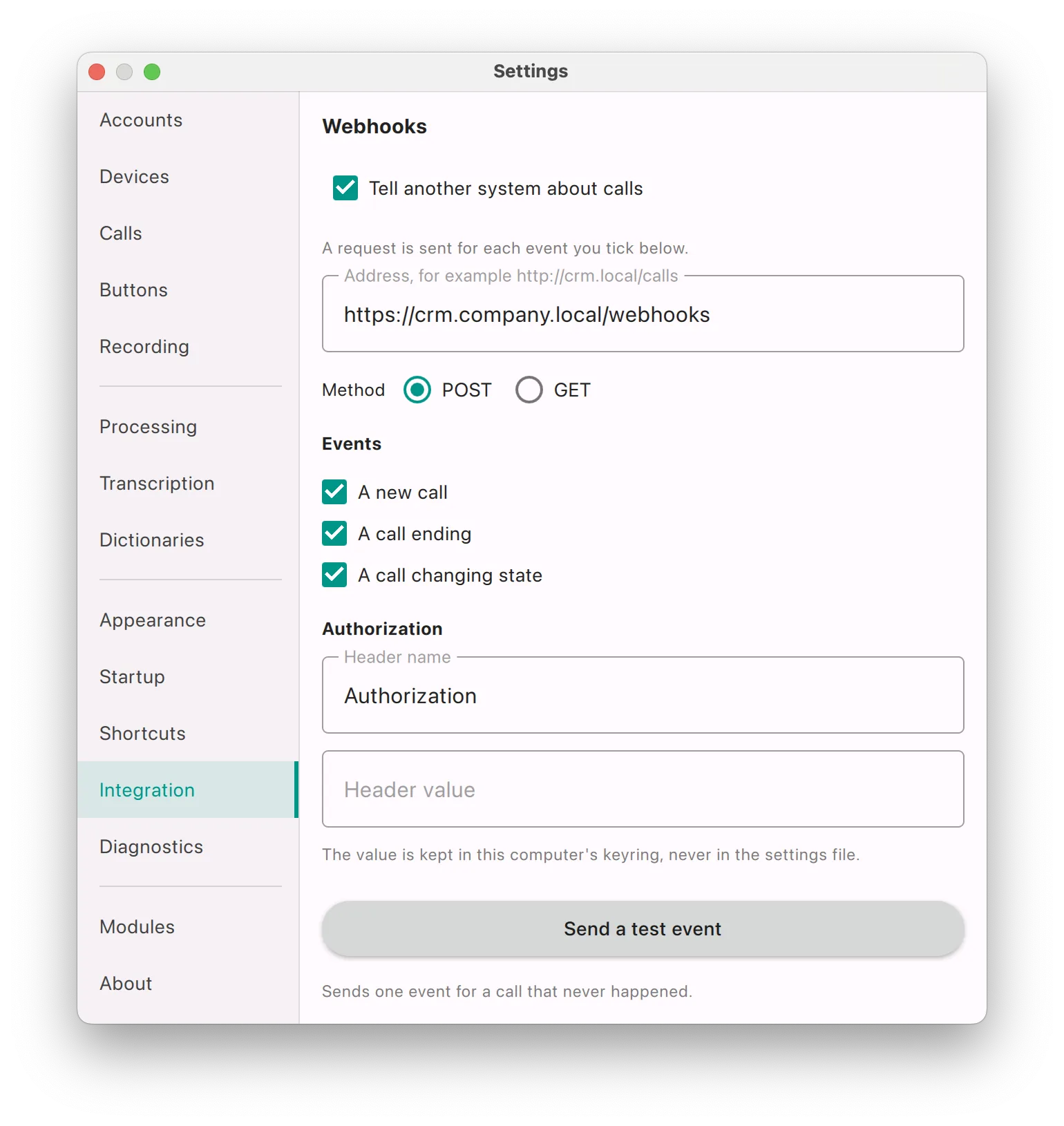
Go to Settings → Integration → Webhooks. Enter the endpoint URL, choose POST or GET, select the events to send and, if your receiver requires it, set a header name and value. No queue, broker or polling is required on your side.

The Webhooks panel in Settings: an endpoint URL field, POST or GET, three event checkboxes, a header name and value, and a button that sends a test event.
Settings → Integration → Webhooks. The header value field shows Saved — type to replace it: like the API token, it is stored in the operating system keychain, never in the settings file.

Events

EventTriggered whenTypical use
Call started
call-started
An incoming call starts ringing or an outgoing call is placed. Screen pop. This event is sent first and should be processed quickly.
Call state changed
call-state-changed
The call’s state changes: it is answered, put on hold or resumed by either side, or joins or leaves a conference. Muting does not send this event. Presence, wallboards, “on a call” indicators, hold timers.
Call ended
call-ended
The call has ended. Call logging: caller, line, duration and end reason.

Each event can be enabled separately. A screen-pop integration may subscribe to the first event only; a call-logging integration may subscribe to the last one only. Disabled events are listed in settings.webhooks.silenced, so support tools can see which events a workstation sends.

Request format

One HTTP request per event is sent to the configured URL, with a JSON body and your custom header, if set. The call’s id is the same UUID as in GET /calls and /calls/{id}/…, so both mechanisms work together: an event signals a change, and the REST API returns the current details.

Use “Send a test event” before writing the parser. It sends a sample event for a fictitious call directly to your endpoint, with the same headers as a real event. Log the raw request body and build your receiver against what your version actually sends.

event bodyjson
{
        "event":        "call-started",                           // call-started, call-state-changed or call-ended
        "id":           "7620f1c5-fa8e-4453-80bf-4274f5324bec",   // same id as in /calls
        "direction":    "in",
        "state":        "ringing-in",                             // same values as state in /calls
        "number":       "+15551234567",                           // match CRM records on this field
        "name":         "Jane Miller",                            // resolved from contacts, may be ""
        "uri":          "sip:+15551234567@pbx.example.com",
        "dialed":       "",
        "account":      "1001@pbx.example.com",                   // line used for the call
        "account_id":   "aa24a2c4-709b-402a-ac58-7ca6788dcb94",
        "event_ts":     "1788788890412",                          // Unix milliseconds, as a string
        "duration_s":   "0",
        "reason":       "none",
        "answered_by":  "no",
        "seance_id":    "0b6f1d2e-5c3a-4f8e-9a71-2d4c6e8f0a13",   // shared across transfers and conferences
        "callstart_ts": "1788788890398",
        "callstate_ts": "1788788890398"
      }

Event fields

FieldDescription
eventcall-started, call-state-changed or call-ended.
idThe call’s UUID, as in GET /calls.
stateSame values as state in GET /calls.
direction / number / name / uri / dialed / account / account_idAs in GET /history.
event_ts / callstart_ts / callstate_tsWhen the event happened, when the softphone first learned of the call, and when the call entered its current state. Unix milliseconds (UTC).
duration_sTalk time in seconds, from answer to hang-up. Set on call-ended for an answered call; 0 otherwise.
reasonHow the call ended: local-hangup, remote-hangup, busy, no-answer, cancelled, …; none until then.
answered_byno if answered by a person; otherwise what answered the call.
seance_idThe conversation the call belongs to. Calls linked by a transfer, a consultation or a conference share the same seance_id.

In webhooks every value is a string, numbers and instants included: "duration_s": "42", "event_ts": "1788788942412". An unknown instant is an empty string. In the REST API the same fields are JSON numbers, and an unknown instant is null.

One conversation across transfers

seance_id groups the calls that make up one conversation. A call placed or received from scratch starts a new seance. A call created by a transfer, a call that replaces another, a consultation about a call and every call joined into a conference keep the seance of the call they came from. Between phones the seance travels in the SIP header X-Seance-Id: when a call is transferred to a colleague who also uses AI Softphone and the PBX passes the header through, both workstations report the same seance_id.

Receiver example

About thirty lines with no dependencies beyond a web framework. It returns 200 immediately and processes the event afterwards — the key rule for webhook receivers.

webhook_receiver.pypython · flask
from flask import Flask, request
      import threading, logging
      
      app = Flask(__name__)
      SECRET = "the value you pasted into Settings"
      
      # Respond immediately; process the event outside the request thread.
      # A slow receiver does not slow down the softphone, but it fills
      # the delivery queue, and a full queue drops events.
      def handle(event):
          if event.get("event") != "call-started":  # a screen pop needs the first event only
              return
          number = event.get("number") or ""
          customer = crm.find_by_phone(number)          # your code
          if customer:
              crm.pop_card(customer.id)                 # your code
          else:
              crm.pop_new_lead(number)                  # your code
      
      @app.route("/webhooks", methods=["POST", "GET"])
      def webhooks():
          if request.headers.get("Authorization") != SECRET:
              return "", 401
      
          event = request.get_json(silent=True) or request.args.to_dict()
          logging.info("softphone event: %s", event)   # keep for a week
      
          threading.Thread(target=handle, args=(event,), daemon=True).start()
          return "", 200
      
      if __name__ == "__main__":
          app.run(host="0.0.0.0", port=8080)
the same receiver in Node.jsjavascript · express
const express = require("express");
      const app = express();
      app.use(express.json());
      
      const SECRET = process.env.SOFTPHONE_SECRET;
      
      app.all("/webhooks", (req, res) => {
        if (req.get("Authorization") !== SECRET) return res.sendStatus(401);
      
        const event = Object.keys(req.body || {}).length ? req.body : req.query;
        res.sendStatus(200);                     // respond first
      
        setImmediate(() => handle(event));       // then process
      });
      
      app.listen(8080);

Delivery semantics

Events are queued instead of being sent from the call-handling thread, so a slow receiver never delays ringing or transfers. If the queue fills up, events are dropped and counted in webhooks_dropped_total. Rejected and failed deliveries are counted as well. Events are delivered in order and at least once: make your handler idempotent, keyed on id, event and callstate_ts.

BehaviourImpact on your integration
Events are queued, not sent from the call threadA slow receiver never delays calls, ringing or transfers.
A full queue drops eventsIf your receiver stops responding, events are lost but telephony keeps working. Monitor webhooks_dropped_total.
Refused and unreachable deliveries are countedwebhooks_failed_total increasing while webhooks_delivered_total stays flat indicates a receiver problem.
Events are delivered in orderCall started, then state changes, then call ended. To order events you have already stored, use callstate_ts rather than arrival time.
At-least-once deliveryMake the handler idempotent: id, event and callstate_ts together identify an event.
GET instead of POSTFor receivers that cannot accept a request body, such as legacy CRMs or script bridges. The same event data is sent as query parameters.

With GET, a URL template can be used instead of a plain URL: each [field] is replaced with that field’s value, percent-encoded — for example https://crm.local/pop?phone=[number]&call=[id]. Placeholders use the field names listed above. Templates saved with the earlier names ([accountId], [at], [duration], [answeredBy], [seanceId]) keep working.

Webhooks are sent from the workstation, so the URL only has to be reachable from that computer. An internal http://crm.local/calls works as well as a public HTTPS endpoint, and no inbound firewall rules are required.

Step by step

CRM screen pop: an end-to-end example

A typical first integration, in the recommended order. It usually takes a few hours.

  1. Enable both integrations

    Go to Settings → Integration. Enable Local control and Tell another system about calls. Point the webhook URL to a machine where you can read the logs, such as your development laptop.

  2. Send a test event

    Before writing any code, capture the request: method, headers and exact body. Build against what your version actually sends.

  3. Create a receiver, log requests, return 200

    Use the example above. Once it responds, check that webhooks_delivered_total in /metrics increases, then add parsing.

  4. Match the number and open the record

    On Call started, look up number in your database. If a match is found, open the record; otherwise, open a new lead form with the number prefilled. This happens during the first ring.

  5. Log the call when it ends

    On call-ended, save the call: the event carries the line, duration_s and reason. For the outcome, take the entry from GET /history?limit=20 with the same seance_id and number.

  6. Add a click-to-call button

    Add a button to your CRM that sends POST /calls with the record’s number: a few lines of JavaScript calling 127.0.0.1, no telephony expertise required.

  7. Handle restarts

    When your service starts, call GET /history?limit=200, skip the ids you already have and store the rest. Use webhooks for real-time processing and call history to fill gaps.

click-to-call buttonjavascript · CRM web page
async function dial(number) {
        const r = await fetch("http://127.0.0.1:8377/calls", {
          method: "POST",
          headers: { "Content-Type": "application/json" },
          body: JSON.stringify({ number })
        });
        if (!r.ok) console.warn("softphone:", (await r.json()).error);
      }

A web page that calls 127.0.0.1 reaches the computer the browser runs on — the same workstation where the softphone runs. That is why click-to-call needs no server-side component.

Security

Security model

Both integrations are disabled after installation. Neither sends data anywhere unless you configure it.

Network exposure

  • The API listens on the loopback interface only: not on the LAN, a VPN or a container bridge.
  • Both features are disabled by default; nothing listens until you enable them.
  • Access groups can be disabled individually; the paths of a disabled group are not served at all, rather than returning empty responses.
  • Every rejected request is counted, so misconfiguration is visible in the metrics.

Credentials

  • The API token is stored in the operating system keychain — not in the settings file and not in GET /settings.
  • The webhook header value is stored the same way.
  • GET /accounts never returns SIP passwords; no endpoint does.
  • A copied or backed-up settings file contains no credentials.

The one setting that requires a deliberate decision: without a token, any program running on that computer can read the contacts and call history allowed by the access groups and control calls. This is acceptable on a personal workstation, but not on shared or kiosk machines. There, set a token, keep it out of source control and give it only to the integration that needs it.

Recordings and transcripts are not available as JSON. The API serves them as HTML pages: /ui, and /ui/recordings/{id} for a recording with its transcript. Link to these pages from your CRM instead of transferring audio: the link opens on the workstation that stores the recording, and the audio never leaves it.

When it does not work

Common issues

SymptomWhat to check
Connection refused on 127.0.0.1:8377Local control is disabled, the softphone is not running, or the port was changed. Check the settings on the workstation.
404 {"error":"no such endpoint"} for a documented pathThe access group for this path is disabled. A non-existent path returns the same response by design.
Read requests work, write requests are rejectedWrite endpoints require the token in the Authorization header. Without it, they are neither served nor listed.
No webhooks arriveUse Send a test event. If the test event arrives, the required events are disabled; if not, the URL is wrong or unreachable from the workstation.
webhooks_failed_total is increasingYour receiver rejects requests or is unreachable. Check its logs and whether it responds to a simple request from the workstation.
webhooks_dropped_total is above zeroYour receiver responded too slowly for too long and the queue filled up. Return 200 first, then process the event.
Duplicate eventsExpected with at-least-once delivery. Treat events with the same id, event and callstate_ts as one.
Category titles are not in EnglishTitles follow the interface language. Match on code from GET /taxonomy, never on title.
accountId, startedAt or at are missingThe integration was written for the earlier field names. Switch to account_id, callstart_ts and event_ts; the full list is under Endpoints.

For SIP-level issues, use the Diagnostics page: it shows the live signalling exchange between the softphone and the PBX and quality metrics for each call.

Source code

The repository is not open yet. The licence is GPL v2, so it will be: what is left is the tidying, not the decision.